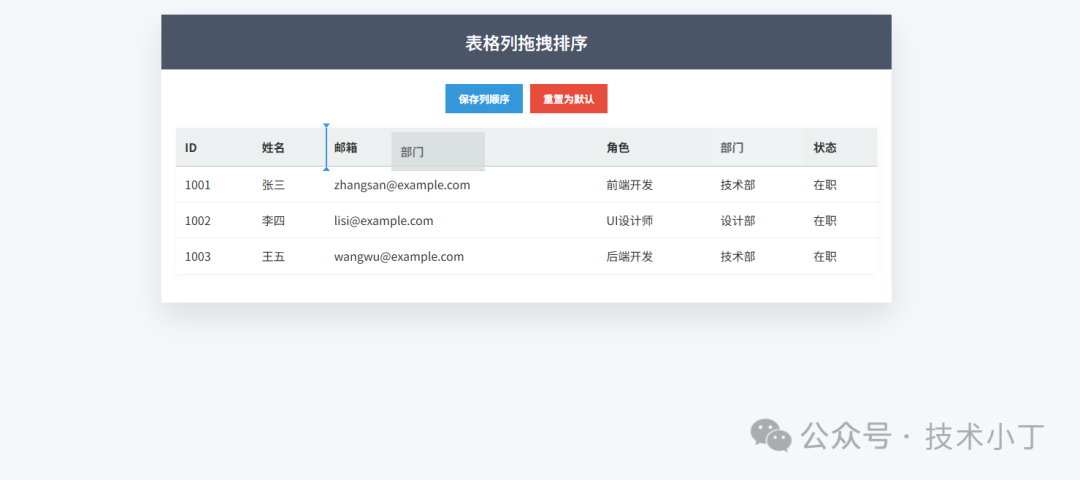
随着数据展示需求日益复杂,用户对数据呈现的个性化要求也在不断提升。传统的静态表格已无法满足用户灵活调整信息优先级的需求。通过拖拽操作重新排列表格列,不仅能够提升用户体验,还能让用户根据自身偏好快速定位重要信息。这种交互方式直观易懂,无需复杂的设置过程,大大提高了数据查看的效率。本文将介绍如何使用 HTML、CSS 和 JavaScript 实现表格列拖拽排序功能。效果演示
在这个表格列拖拽排序功能中,用户可以通过鼠标拖拽表头列来重新排列整个表格的列顺序。当用户点击并拖动某个表头元素时,该列会进入拖拽状态,并且会在表格上方显示一个蓝色指示线,提示用户当前可放置的位置。用户可以将列拖拽到表格中的任意位置,释放鼠标后,该列及其对应的数据列将移动到新位置。此外,还提供了保存当前排序和恢复默认排序的功能,使得用户的自定义布局能够持久化保存。
页面结构
控制按钮区域
控制按钮区域包含保存排序和重置排序两个按钮,用户可以通过这些按钮管理表格列的排序状态。<div class="controls"> <button id="save-order">保存列顺序</button> <button id="reset-order" class="reset">重置为默认</button></div>
表格容器区域
表格容器区域包含实际的表格元素和插入指示器,这是实现拖拽功能的核心区域。<div class="table-container"> <div class="insert-line" id="insert-line"></div> <table id="table-column"> <thead> <tr> <th data-column="id">ID</th> <th data-column="name">姓名</th> <th data-column="email">邮箱</th> <th data-column="role">角色</th> <th data-column="department">部门</th> <th data-column="status">状态</th> </tr> </thead> <tbody> <tr> <td>1001</td> <td>张三</td> <td>zhangsan@example.com</td> <td>前端开发</td> <td>技术部</td> <td>在职</td> </tr> </tbody> </table> </div>
核心功能实现
拖拽事件监听
实现表格列拖拽排序的第一步是为表头元素添加拖拽事件监听器。我们需要设置每个表头元素为可拖拽状态,并处理 dragstart、dragover、drop 和 dragend 事件。在 dragstart 事件中,我们将被拖拽的元素标记为 dragging 状态,并设置数据传输对象,以便在拖拽过程中传递必要的信息。thElements.forEach(th => { th.setAttribute('draggable', true);
th.addEventListener('dragstart', function(e) { draggedElement = th; setTimeout(() => th.classList.add('dragging'), 0); e.dataTransfer.effectAllowed = 'move'; e.dataTransfer.setData('text/plain', th.getAttribute('data-column')); });
th.addEventListener('dragend', function() { th.classList.remove('dragging'); hideIndicators(); draggedElement = null; });
th.addEventListener('dragover', function(e) { e.preventDefault(); e.dataTransfer.dropEffect = 'move'; showInsertIndicator(th, e.clientX) });
th.addEventListener('drop', function(e) { e.preventDefault(); reorderCells(th, e.clientX) });});
插入位置指示器显示
为了给用户提供清晰的视觉反馈,我们需要实现一个插入位置指示器。当用户拖拽列经过其他列时,系统会计算鼠标相对于目标列的位置,如果鼠标位于列的左半部分,则在列左侧显示指示线;如果位于右半部分,则在右侧显示指示线。这样可以帮助用户准确地了解他们想要放置列的具体位置。function showInsertIndicator(th, mouseX) { if (draggedElement && th !== draggedElement) { const elementRect = th.getBoundingClientRect(); const centerX = elementRect.left + elementRect.width / 2; const containerRect = tableContainer.getBoundingClientRect();
if (mouseX < centerX) { insertLine.style.left = (elementRect.left - containerRect.left) + 'px'; } else { insertLine.style.left = (elementRect.right - containerRect.left) + 'px'; }
insertLine.style.display = 'block'; insertLine.style.top = (elementRect.top - containerRect.top) + 'px'; insertLine.style.height = elementRect.height + 'px'; }}
数据列同步移动
reorderCells 函数是实现表格列拖拽排序的关键。当用户释放鼠标完成拖拽操作时,不仅要移动表头,还要同步移动表格主体中的相应数据列。这个过程比较复杂,因为我们需要同时更新表头和每一行数据的顺序。在这里,我们会获取被拖拽列和目标列的索引,然后对表格中的每一行执行相同的数据列移动操作,确保表头和数据保持一致。function reorderCells(th, mouseX) { if (draggedElement && th !== draggedElement) { const elementRect = th.getBoundingClientRect(); const centerX = elementRect.left + elementRect.width / 2;
const allTh = Array.from(table.querySelectorAll('th')); const draggedIndex = allTh.indexOf(draggedElement); const targetIndex = allTh.indexOf(th); if (mouseX < centerX) { th.parentNode.insertBefore(draggedElement, th); rows.forEach(row => { const cells = Array.from(row.querySelectorAll('td')); const draggedCell = cells[draggedIndex]; const targetCell = cells[targetIndex];
if (draggedIndex > targetIndex) { targetCell.parentNode.insertBefore(draggedCell, targetCell); } else { targetCell.parentNode.insertBefore(draggedCell, targetCell); } }); } else { th.parentNode.insertBefore(draggedElement, th.nextSibling); rows.forEach(row => { const cells = Array.from(row.querySelectorAll('td')); const draggedCell = cells[draggedIndex]; const targetCell = cells[targetIndex];
if (draggedIndex < targetIndex) { targetCell.parentNode.insertBefore(draggedCell, targetCell.nextSibling); } else { targetCell.parentNode.insertBefore(draggedCell, targetCell.nextSibling); } }); } } hideIndicators();}
本地存储与状态恢复
为了让用户的自定义排序设置在页面刷新后仍然保留,我们需要实现数据的持久化存储功能。当用户点击保存按钮时,程序会获取当前表格列的顺序,将其转换为 JSON 格式并保存到浏览器的 localStorage 中。当页面加载时,系统会尝试从本地存储中读取之前保存的列顺序,并按照该顺序重新排列表格列。saveButton.addEventListener('click', function() { const currentOrder = Array.from(table.querySelectorAll('th')).map(th => th.getAttribute('data-column') ); localStorage.setItem('tableColumnOrder', JSON.stringify(currentOrder));});
function loadSavedOrder() {    const savedOrder = localStorage.getItem('tableColumnOrder');    if (savedOrder) {      try {        const order = JSON.parse(savedOrder);        const ths = Array.from(table.querySelectorAll('th'));        const tds = rows.map(row => Array.from(row.querySelectorAll('td')));
        const thContainer = table.querySelector('tr');        order.forEach(columnId => {          const th = ths.find(th => th.getAttribute('data-column') === columnId);          if (th) thContainer.appendChild(th);        });
        rows.forEach((row, rowIndex) => {          const cells = tds[rowIndex];          order.forEach(columnId => {            const th = ths.find(th => th.getAttribute('data-column') === columnId);            if (th) {              const thIndex = ths.indexOf(th);              row.appendChild(cells[thIndex]);            }          });        });      } catch (e) {        console.error('加载保存的列顺序时出错:', e);      }    }}
重置功能实现
当用户点击重置按钮时,系统会将表格列恢复到页面初次加载时的默认顺序。实现这个功能需要保存原始顺序信息,在页面初始化时记录所有列的顺序作为基准,当需要重置时,按照这个基准顺序重新排列表头和数据列。const originalOrder = thElements.map(th => th.getAttribute('data-column'));
resetButton.addEventListener('click', function() {    const ths = Array.from(table.querySelectorAll('th'));    const tds = rows.map(row => Array.from(row.querySelectorAll('td')));
    const thContainer = table.querySelector('tr');    originalOrder.forEach(columnId => {      const th = ths.find(th => th.getAttribute('data-column') === columnId);      thContainer.appendChild(th);    });
    rows.forEach((row, rowIndex) => {      const cells = tds[rowIndex];      originalOrder.forEach(columnId => {        const th = ths.find(th => th.getAttribute('data-column') === columnId);        const thIndex = ths.indexOf(th);        row.appendChild(cells[thIndex]);      });    });});
扩展建议
提供列配置面板,方便用户批量管理表格列设置
添加列可见性切换功能,让用户可以隐藏不关心的列
添加列锁定功能,防止用户误操作
源码地址
阅读原文:https://mp.weixin.qq.com/s/xj_otyK47081G3r-fOO72g
该文章在 2026/1/22 18:20:29 编辑过






 400 186 1886